Your weather,
your way.

Dense weather data made readable, for people and for their agents.

Skylar blends many forecast models, checks them against real stations, and tells you what it means for your day in plain sentences, with a clear verdict and the chart to back it up.

Launching in the US. Private beta now.

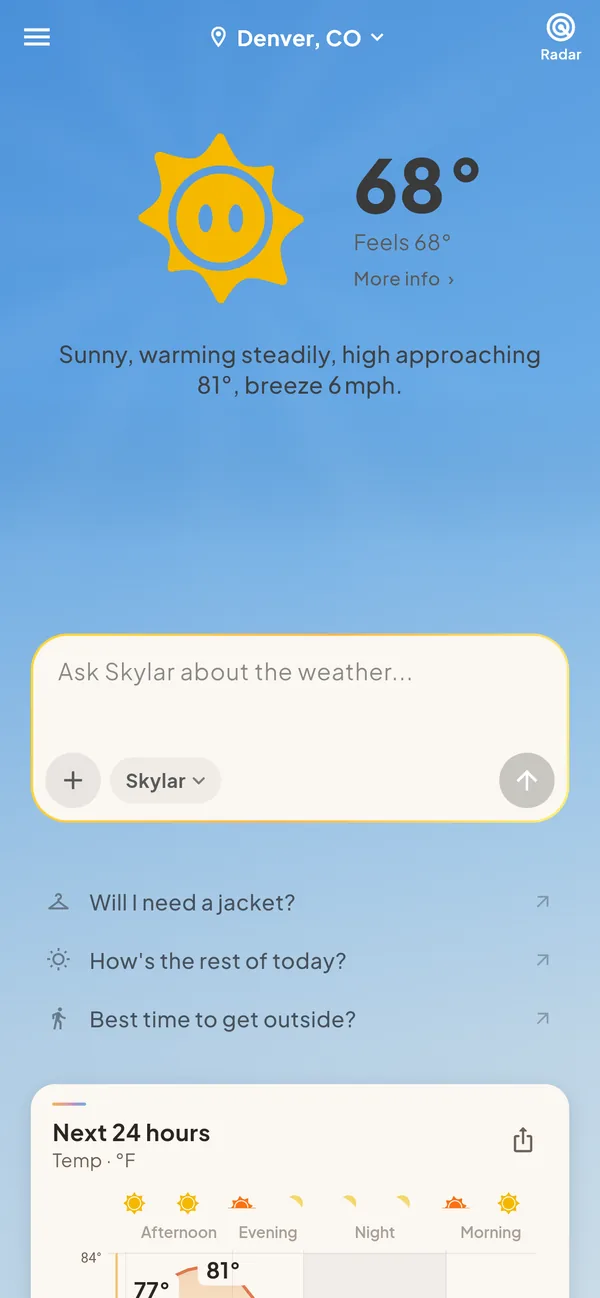
Skylar home screen for Denver: 68 degrees and sunny, with the line ‘Sunny, warming steadily, high approaching 81°, breeze 6 mph’ and a box to ask Skylar about the weather.
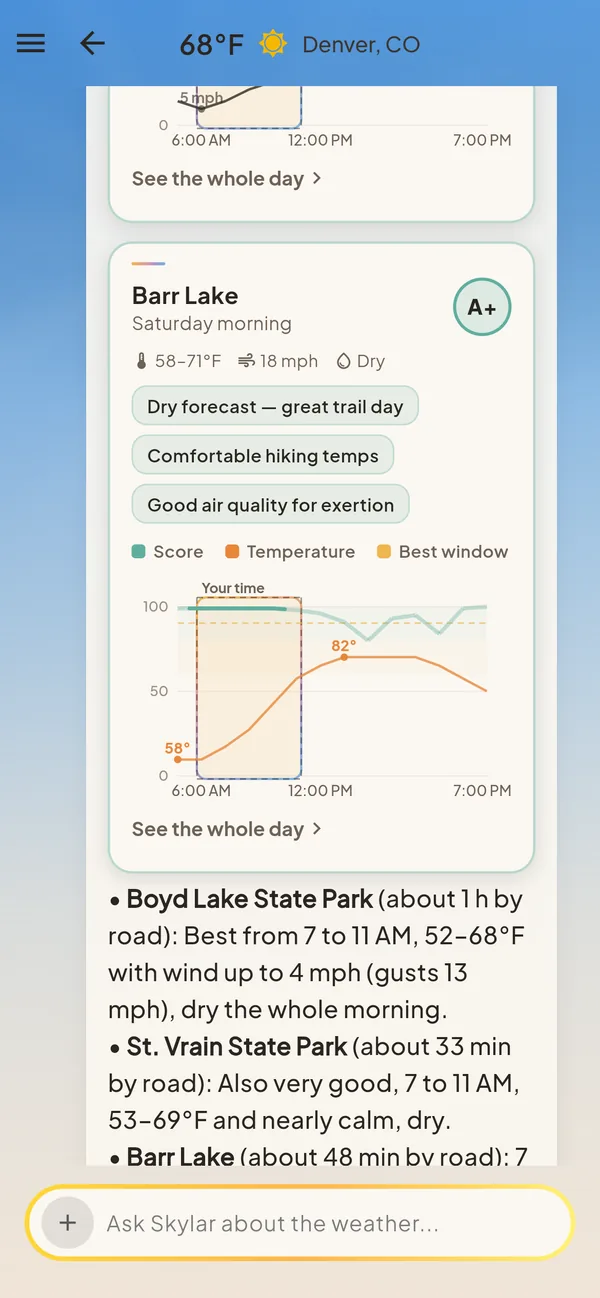
A Skylar chat answer about hiking near Boulder on Saturday morning: Barr Lake gets an A+, dry, 58 to 71 degrees, with a chart of the best window.

How it works

From dense data to a clear answer.

A forecast starts as millions of numbers from models that rarely agree. Skylar does the reading, so you get the part that matters.

  1. 1 · Many models

    Blended into one consensus

    Blends a dozen+ weather models (HRRR, RRFS, NBM, GFS, ECMWF and more) into one consensus.

  2. 2 · Real observations

    Checked against the ground

    Corrects model bias with real observations from thousands of stations. Readings are quality-checked first, and each correction fades the further ahead the forecast looks.

  3. 3 · A clear answer

    A sentence, a verdict, a chart

    What to expect, whether it suits your plans, and when. Written the way a forecaster would say it to a friend.

Updated continuously; the most detailed data runs in 15-minute steps for the next hours.

What the models hand you

2 pmHRRRNBMGFSECMWF
TMP K291.4290.8292.6291.1
DPT K276.2275.9277.8276.4
GUST m/s11.89.413.110.2
APCP 1h0.000.000.250.00
APCP 4 pm0.380.210.940.30
VIS m24135160932413520000
REFC dBZ31.5–––

Denver, one afternoon. Kelvin, metres per second, kilograms per square metre. Four models, four answers.

What Skylar says

Denver this afternoon

Skylar forecast

Mild and dry through lunch. A few showers possible after 3 pm, clearing by evening. Breezy at times, gusts near 25 mph.

HikingGo, best 8–11 am
GolfCaution after 2 pm, gusty
Concrete pourNo-go after 3 pm, showers

The app

Built around the things you actually do.

Every screen and card below comes from the current build of the app.

Plan around the weather

800+ activities, from hiking and golf to running, fishing and pouring concrete. Each one has its own limits, so Skylar can give a straight verdict and point to the best hours.

Go Caution No-go

Ask the way you’d say it: tomorrow morning, this weekend, after work next week. Skylar finds the window.

A Skylar best-windows card for running: best Wednesday 5 to 6 PM, also good Thursday and Friday at the same hour, with a chart of the activity score and wind gusts across the week.

Ask Skylar anything

Ask a weather question and get an answer you can read in seconds, with the chart that explains it.

  • Meteograms: temperature, rain, wind and sky in one picture
  • Best-window charts for any activity
  • Route maps with the weather at each stretch of road
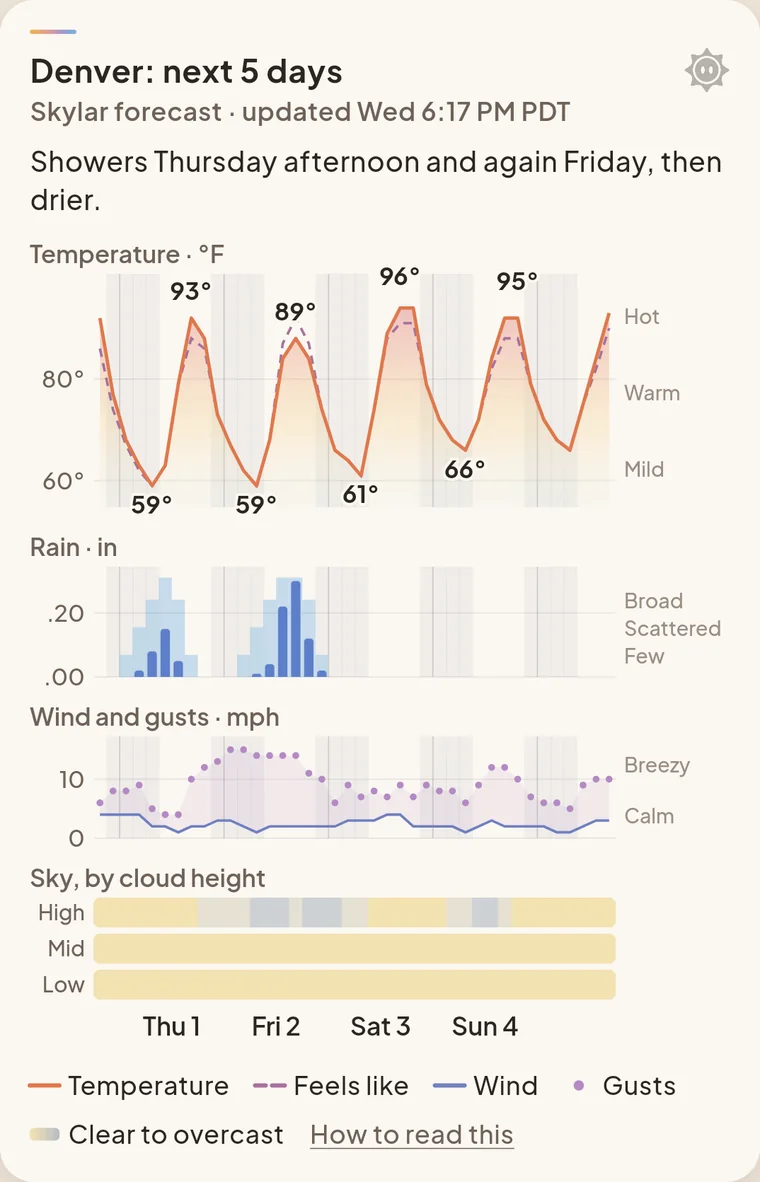
A Skylar chart card, Denver next five days: showers Thursday afternoon and again Friday, then drier. Temperature, rain, wind and cloud panels.

Your favorites, on your home screen

Pick the things you do. Each favorite gets a home card with its week: the best day, the best hours and a grade for every day.

  • Choose which cards you see and where they sit
  • Cards only show up when they have something to say
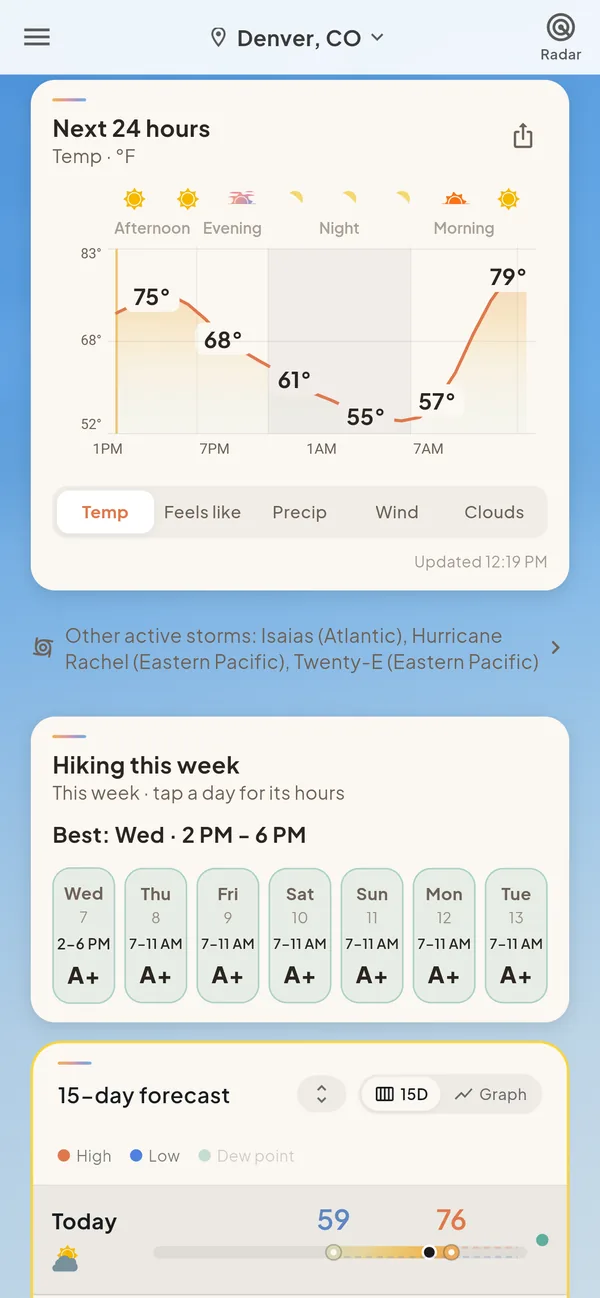
The Skylar home screen scrolled down: a next-24-hours temperature chart and a Hiking this week card with a grade and best hours for each day.

Skylar keeps watching

Track a plan, like a hike on Saturday or a drive on Sunday. Skylar keeps checking the forecast for it and tells you when something changes, so you don’t have to keep looking.

How tracking works

  • Pick what to watch. An activity from your favorites, or a route, on a day and time.
  • Re-checked with every update. Each time the forecast updates, Skylar runs your plan again.
  • Measured against its own limits. The same thresholds behind that activity’s verdict, so a hike and a round of golf each care about their own things.
  • A push when it changes. When the verdict moves, say from go to caution, or when a better window opens up.
  • On the road, too. For drives, route monitors can alert you on the way if conditions change ahead.
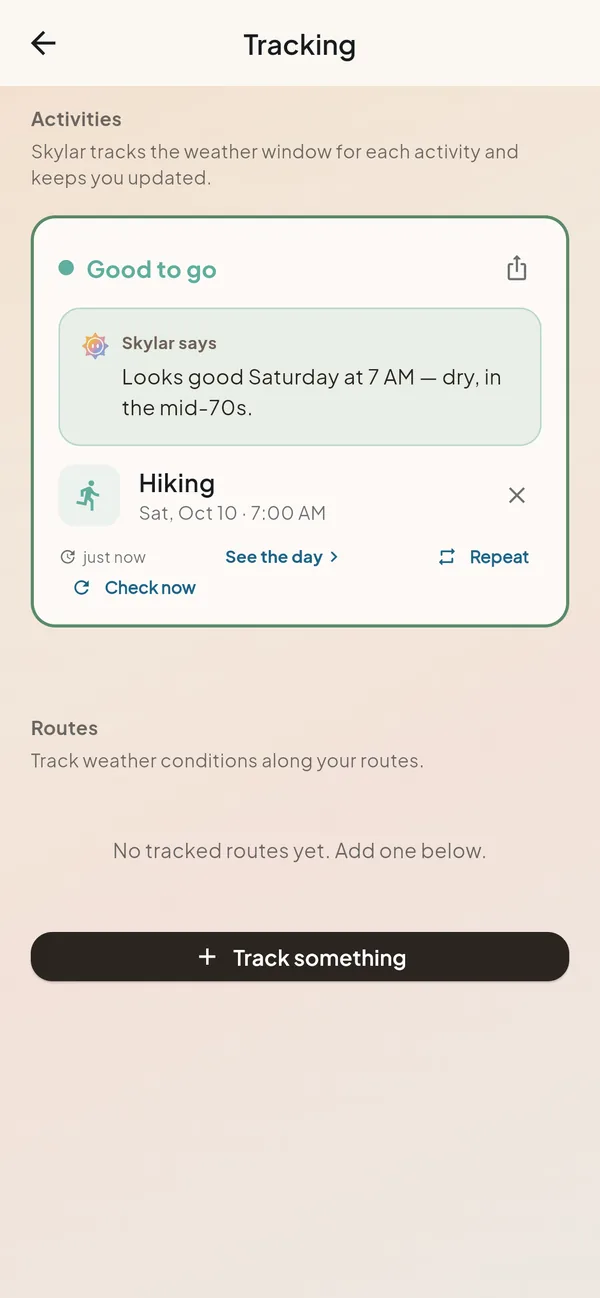
The Skylar tracking screen with a hike tracked for Saturday at 7 AM: good to go, and Skylar says it looks good Saturday at 7 AM, dry, in the mid-70s.
Example notifications through the week for a tracked hike.
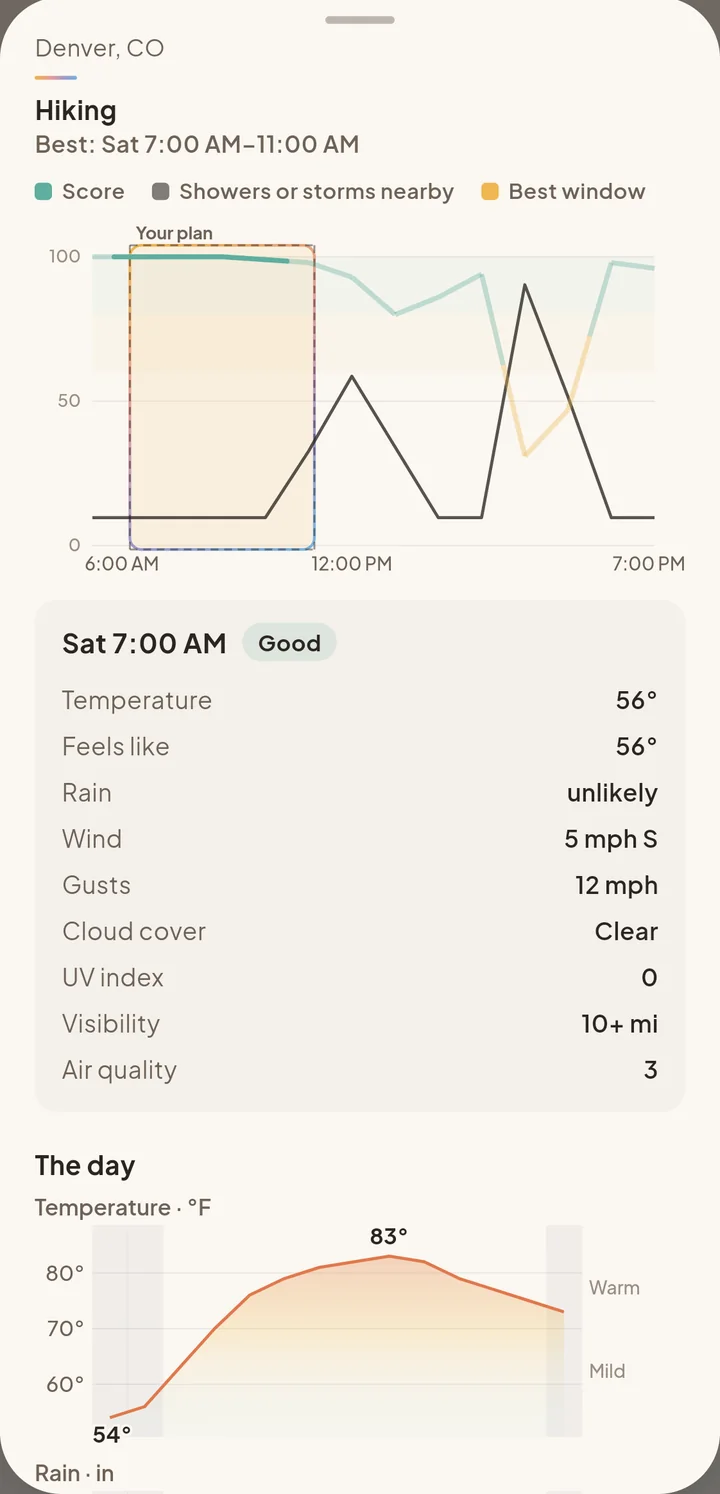
The day view for a tracked hike: best Saturday 7 to 11 AM, a chart with your plan marked, and the conditions at 7 AM rated good.
Tap a tracked plan to see its day: your hours, the best window, and why.

Weather along the drive

Not the weather where you are now, but the weather on each stretch of road at the time you’ll be driving it. Skylar grades the trip and looks for a better time to leave.

How route weather works

  • Split into stretches. Checkpoints along the road, about every 15 to 30 minutes of driving.
  • Forecast for when you’re there. Each stretch gets the forecast for the time you’ll actually reach it.
  • Checked against driving limits. Visibility, gusts, snow rate and heavy rain, plus black-ice risk when it’s below freezing and there’s moisture.
  • One grade, with the reason. A to F, and what set it, like “Snow near Fort Collins around 10:40.”
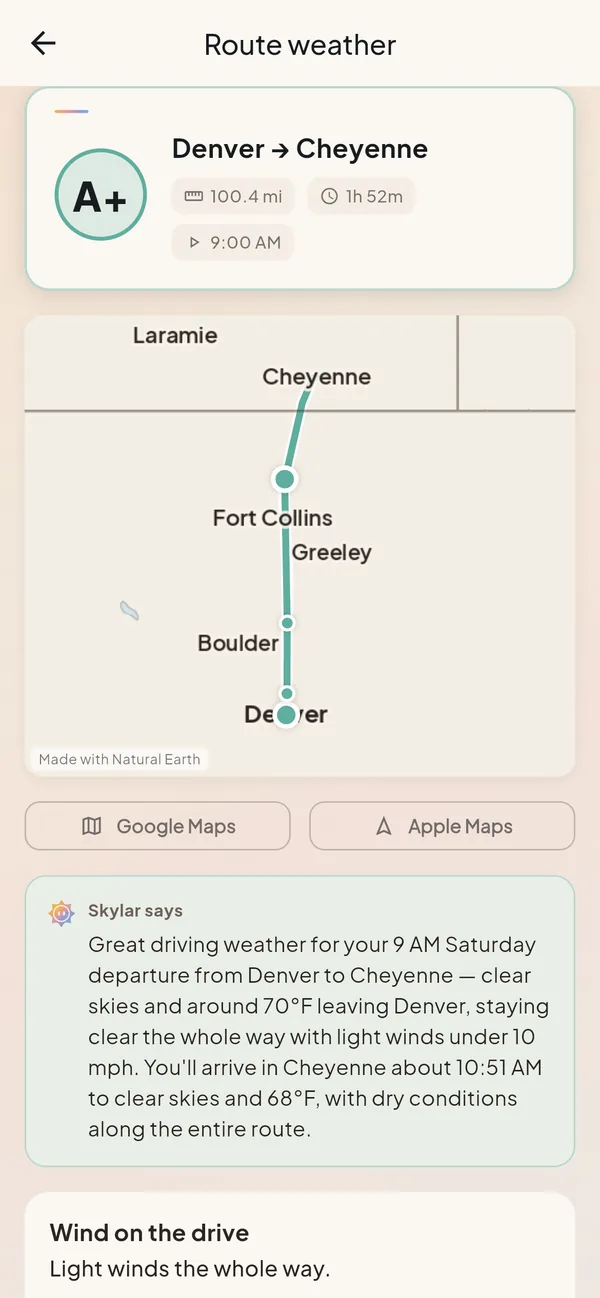
The Skylar route weather screen: Denver to Cheyenne, grade A+, 100.4 miles, 1 hour 52 minutes, leaving 9:00 AM, with the route map and Skylar’s summary of the drive.
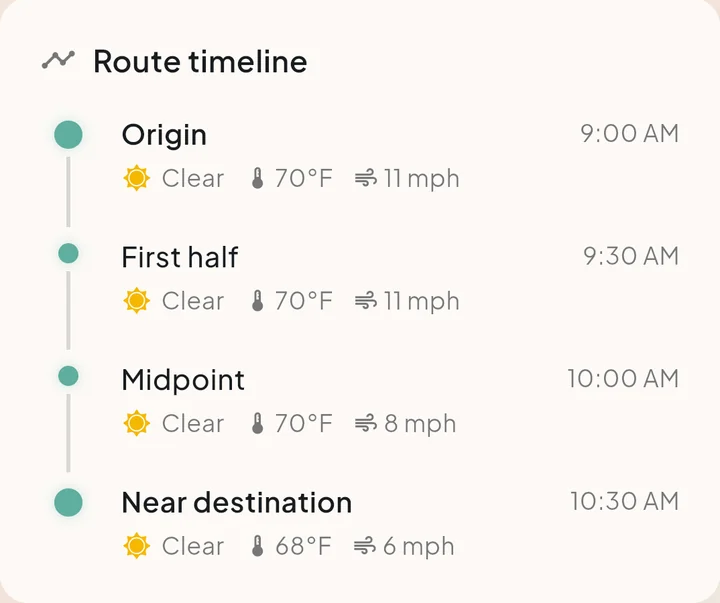
The route timeline: origin at 9:00 AM, first half at 9:30, midpoint at 10:00, near destination at 10:30, each clear with its temperature and wind.
Stop by stop, with the time you’ll reach each one and the weather there.
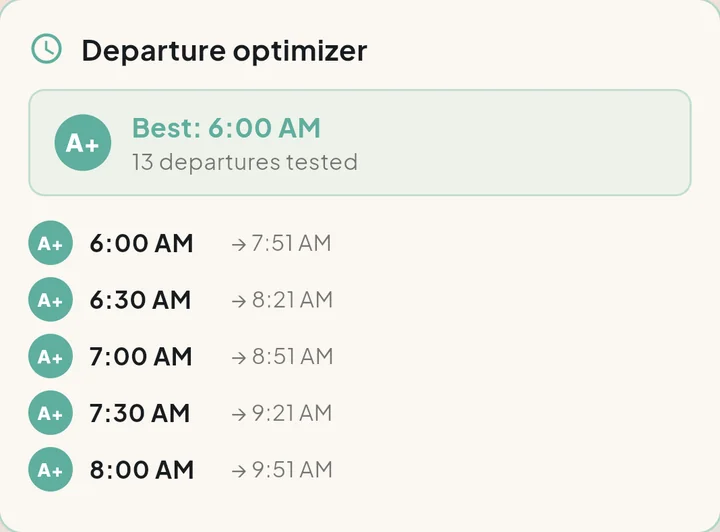
The departure optimizer: best 6:00 AM, 13 departures tested, with leave and arrival times from 6:00 to 8:00 AM, each graded A+.
The departure optimizer tries a spread of leave times and shows the best one.
  • Avoid what you’d rather not drive in. Snow, ice, fog or wind.
  • Compare routes. Alternate roads side by side.
  • Wait it out. When a short burst of weather will pass, Skylar says so.
  • Hand it off. Open the route in Google Maps or Apple Maps.

Radar, maps and alerts

A radar loop and maps drawn in Skylar’s own style, with official warnings when they matter.

  • NWS alerts, shown in full
  • Severe weather outlook and a tropical tracker
  • Frost and freeze on the nights that need it
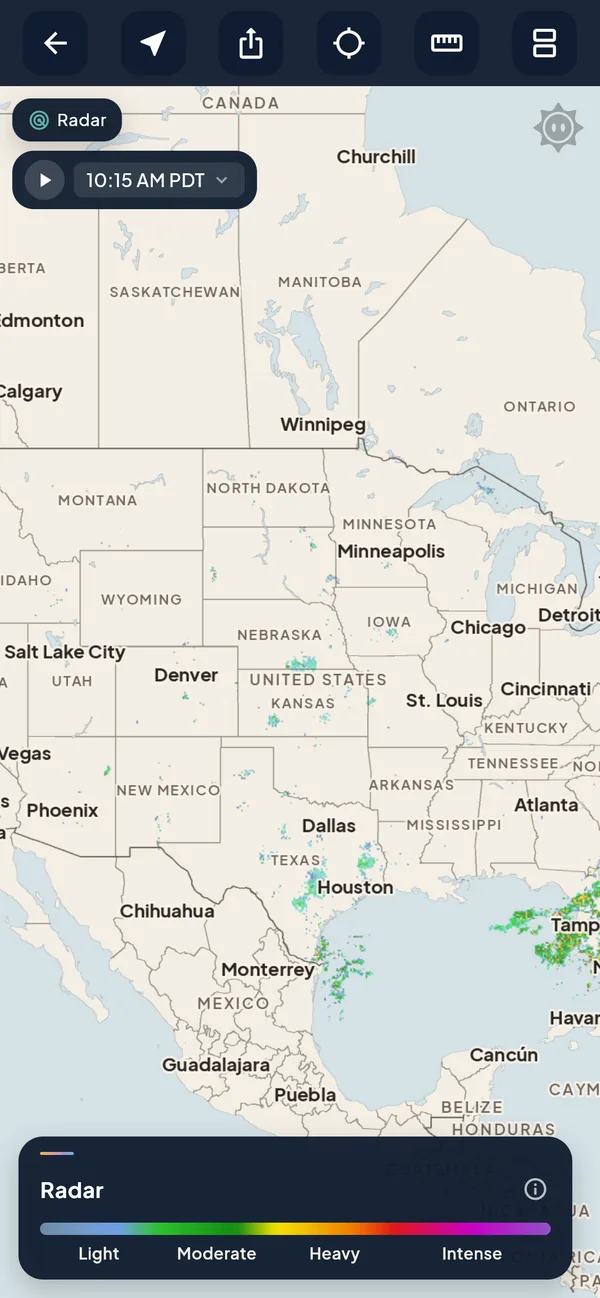
The Skylar radar map of the central US with a light-to-intense legend.

And the long view

The detail is there when you want it, a tap deeper.

15-minute detail
The next hours in 15-minute steps
15-day forecast
Highs, lows and a line for every day
Weeks 3–4
Warmer or cooler than normal, and how sure
Tropical tracker
Follow a named storm from your home screen
Severe outlook
Days with storm risk, in words
Frost
Only on the nights with frost

How Skylar writes

Sentences, not percentages.

A bare number leaves the forecasting to you. Skylar says what it means, in the words a forecaster would use. The numbers are still there, one tap deeper, for when you want them.

Instead of an hourly rain probability

A few showers possible late, clearing by midnight.

Instead of a gust table

Breezy after lunch, with gusts near 30 mph on the ridges.

Instead of a dewpoint and a low

Frost likely by dawn. Cover the tomatoes.

Instead of a spread of model runs

Still uncertain this far out. Firming up by Thursday.

Coming soon · Preview

Weather your agent can read.

Skylar is planned as an MCP server, tied to Skylar accounts, with a plain REST twin for agents that don’t speak MCP. An assistant will be able to ask for forecasts, activity verdicts, best windows and route weather, and get back the same readable answers people see.

Connect it to Claude, ChatGPT, Gemini or any assistant that supports MCP, and your assistant can work like a meteorologist: it reads the same blended models and station checks Skylar does, and answers with a forecaster’s judgment instead of a guess.

Built to connect with Claude · ChatGPT · Gemini · any MCP client

Planned tools

get_forecast
One place: now, the next hours, daily highs and lows, when rain
evaluate_activity
Go / caution / no-go from Skylar’s activity thresholds
compare
2–4 places or days for an activity
get_alerts
Official warnings from the issuing agency
plan_route
Hazards in driving order, with arrival times
get_series
Hour-by-hour / day-by-day series
request_map / request_chart
Skylar-styled maps and charts
request_export
CSV / NetCDF / zarr
get_usage
Plan and units left

Later, with a linked account: schedule_activity, watch_forecast, list_favorites

Preview only. Names and shapes may change before launch.

Answers come back as compact words and numbers an agent can quote, not raw model output.

ExampleAn assistant using Skylar

Person

Is Saturday morning good for a hike near Boulder?

Agent calls Skylar

evaluate_activity {
  "activity": "hiking",
  "place": "Boulder, CO",
  "when": "Saturday morning"
}

Skylar returns

verdict
go
best window
7–11 am
temperature
52° at 7 am, 68° by 11 am
wind
light, gusts near 13 mph
rain
dry through noon
later
warmer and breezier after 1 pm

Agent replies

Saturday morning looks good. Go early: it’s dry from 7 to 11 with light wind, around 52° at the start and 68° by late morning.

Agent calls Skylar

get_forecast {"place": "Denver, CO"}

Skylar returns

now
68°, sunny, light breeze
next hours
warming to 81° by mid-afternoon, dry
today
high 81°, low 54° tonight
rain
none expected today

Illustrative. Real responses will follow the published schema.

From a sentence to a dataset

Under every answer is the same data Skylar uses: a dozen+ weather models blended into one consensus, corrected with real observations from thousands of stations, plus official alerts and radar. It runs in 15-minute steps for the next hours, 15 days ahead, and out to weeks 3–4.

Ask

A readable answer

One call, one place, an answer an assistant can quote.

get_forecast {"place": "Denver, CO"}

Mild and dry through lunch. A few showers possible after 3 pm, clearing by evening. High near 68°.

Pull the numbers

The full series, as files

get_series returns hour-by-hour and day-by-day series. request_export hands back whole datasets.

time,temp_f,wind_mph,gust_mph,precip_in,sky
2026-10-10T07:00-06:00,52,4,9,0.00,clear
2026-10-10T08:00-06:00,56,5,10,0.00,clear
2026-10-10T09:00-06:00,61,6,12,0.00,mostly clear
2026-10-10T10:00-06:00,65,7,13,0.00,partly cloudy
2026-10-10T11:00-06:00,68,8,15,0.00,partly cloudy
2026-10-10T12:00-06:00,71,10,18,0.00,partly cloudy

denver_hourly.csvdenver_hourly.ncdenver_hourly.zarr

See it

Skylar’s own charts and maps

request_chart and request_map return the same Skylar-styled visuals the app shows.

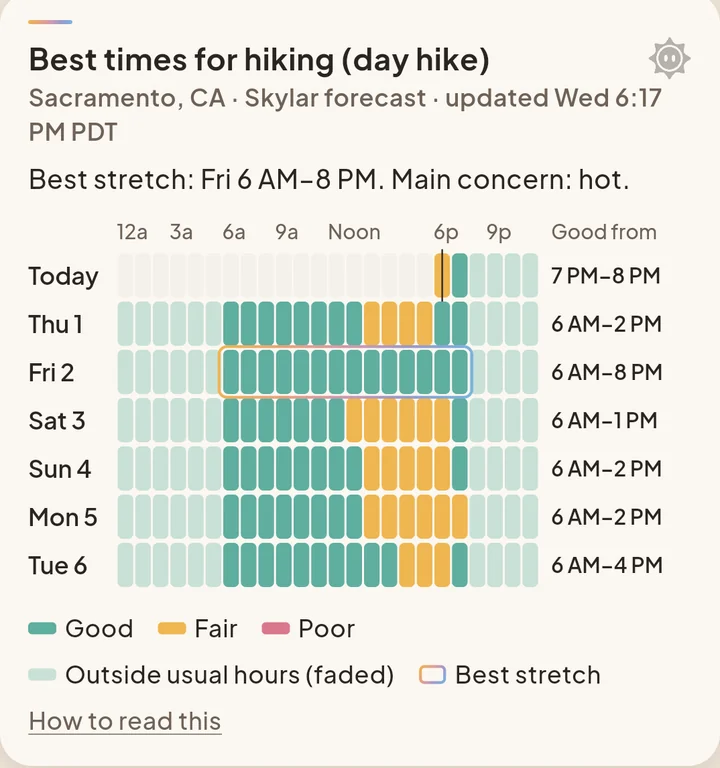
A Skylar chart card from the app: best times for a day hike over the week, hour by hour, shaded good, fair or poor, with the best stretch outlined.

Fits into your stack. MCP for assistants, and a plain REST twin with an OpenAPI description for code and pipelines, so a team can pull the same consensus data into notebooks, dashboards or their own models.

Plans

Start free. Go further when the weather is your work.

The free plan is free for good. Pro and StormTracker add room for more questions, routes and plans.

Free

The everyday forecast, done well.

  • 25 questions to Skylar a week
  • 3 tracked plans and 1 favorite activity
  • 1 route check and 2 looks at 15-minute detail a week

StormTracker

For weather-heavy work and storm season.

  • 1,000 questions to Skylar a week
  • 25 tracked plans and 25 favorite activities
  • 100 route checks and 200 looks at 15-minute detail a week
Compare plans
FeatureFreeProStormTracker
Each week
Questions to Skylar251501,000
Skylar Pro answersDeeper answers to harder questions330300
Route checks110100
15-minute detail220200
Technical questionsModel data, soundings and the like110100
Saved at a time
Tracked plans3525
Favorite activities1525
Custom home cardsYour activity cards and safety cards never count14No limit
Coming soon
Agent access (MCP)Not included1,000 units a month10,000 units a month
Custom mapsComing soon on every plan

Included in every plan

  • The home forecast and 15-day
  • Radar and maps
  • NWS alerts, with push
  • Skylar’s take, in plain sentences
  • 800+ activities

Prices will be announced at launch.

Your weather, your way.

Skylar is in private beta, launching in the US.